Thursday, October 24, 2013

Blog Post #14 Individual Lesson Plan

LUCKY CHARMS COLORS AND SHAPES

Blog Post#10


What can we learn about Teaching and Learning from Randy Paush?

Giving children the inspiration and permission to dream is huge. Being able to enable the dreams of others and for them to know that anything is possible is the key to learning. Brick walls are there for a reason: they let us prove how bad we really want something. The brick walls are also there to keep the ones that aren’t willing to go above and beyond out. We as educators should always have something to bring to the table because this will make the educator feel more welcomed.

Sometimes we have dreams that do not get accomplished completely. Think of playing football and not being very good at it. If we teach the fundamentals first and the rest last the children will gain experiences that will last a life time. When you do something and train and put the time into it , it in turns becomes apart of that person. Experience is what you get when you didn’t get what you wanted. When we screw up and nobody is saying what you are doing is bad is when we should start to worry. Your critics love you and care for you.

We must be willing to wait long enough for our dreams to come true. Put in the work and give it enough time for others to be impressed. Never tell a child that their dreams will not come true. We must also watch our we comment to students in regards to their dreams because you do not want to come across rude or uninterested.

ALWAYS TELL YOUR CLASS THAT THEY CAN DO BETTER AND THIS WILL ENABLE EXPECTATIONS TO BE HIGH!

Saturday, October 19, 2013

Blog Post #9

Video 1: Back to the Future (Briann Smith) By: Briann Smith, Amanda Weller, Heather Smith, and Lisa Smith Back To the Future http://professionaldevelopment4me.files.wordpress.com/2012/06/active-learning-strats.png In Brian Crosby’s TEDx video,

Back To the Future
, he discusses how he guides his student’s learning in a model technology classroom. Crosby has been an upper elementary teacher for over 30 years, and now he facilitates STEM (Science, Technology, Engineering and Math) education for teachers and administrators in six counties in northern Nevada. He has a background in outdoor education and educational technology. He has also integrated his “at risk” students use of technology with field trips, art, hands-on activities and a problem-based approach, to build their schema of the world while connecting them to it.

Crosby starts his presentation off by describing the students that he works with. In his fourth grade class, 90% of his students are second language learners and at risk students. He described at “risk students” as students of poverty. On the second day of school, he gave his fourth graders a survey with a few questions. The survey included questions such as: What city do you live?, What state do you live in?, What country do you live in?, and What is your address? An overwhelming number of his students did not know the answer to the questions. In his presentation he went on to ask, “why is there such a disconnect for these kids”. He explained how the goal when teaching children in these circumstances is to not have a narrowed curriculum. Crosby stressed how important it is to help students who have not had many experiences and inputs to build a schema of the world. In his presentation he goes on to show how he personally used technology, creativity, and hands on activities to help his students learn and think outside of the box.

In his classroom his students have laptops and they all have individual blogs. He also uses an interactive whiteboard and the class has several digital cameras. The different technology tools and resources allow his class the opportunity to think outside the box and work on creative projects. One of the projects the class did was the “High Hopes” High Altitude Balloon Project. The “High Hopes” project involved the students learning about the different layers in the atmosphere. In the project, the students completed the following:

They researched the history of the balloon & ballooning

They built a payload to send the balloon up in the air

The sent a balloon up over a 100,000 feet in the air.

The students embed their videos of the balloon project on their personal blogs

The students used flickr to share & store their photos of the balloon project

The students had to write a story from the point of view of the balloon

They used free online software to create book covers for their stories

They illustrated all of their stories with the pictures from

flickr

They then posted their stories to their blogs

They used their Personal Learning Network to invite other students to join their “High Hopes” Project

They used Google Maps to track the balloon in the air

They used Skype to present & explain their projects to another class in New Zealand

The “High Hopes” project was very creative project for the students and they learned so much while doing it! This one project allowed the students to use so many skills and resources like, 21st Century Learning Tools and so much more. The students were able to not only collaborate with others inside their classroom, but with other students internationally as well. The project also included several

Common Core Standards such as:

English Language Arts Standards: Writing

CCSS.ELA-Literacy.W.4.3 Write narratives to develop real or imagined experiences or events using effective technique, descriptive details, and clear event sequences

CCSS.ELA-Literacy.W.4.6 With some guidance and support from adults, use technology, including the Internet, to produce and publish writing as well as to interact and collaborate with others; demonstrate sufficient command of keyboarding skills to type a minimum of one page in a single sitting

English Language Arts Standards » Speaking & Listening

CCSS.ELA-Literacy.SL.4.1 Engage effectively in a range of collaborative discussions (one-on-one, in groups, and teacher-led) with diverse partners on grade 4 topics and texts, building on others’ ideas and expressing their own clearly.

CCSS.ELA-Literacy.SL.4.4 Report on a topic or text, tell a story, or recount an experience in an organized manner, using appropriate facts and relevant, descriptive details to support main ideas or themes; speak clearly at an understandable pace.

CCSS.ELA-Literacy.SL.4.5 Add audio recordings and visual displays to presentations when appropriate to enhance the development of main ideas or themes.

Brian Crosby’s TEDx video presentation was very informative and inspiring. He essentially changed and impacted those children’s lives forever! He empowered them to become active learners and to use their creativity to think outside of the box. It was incredible to see the rapid change that took place in their learning. It is amazing to think that on the second day of school the students did not know the answers to basic questions like, what country do you live in? To think a few months later, for their “High Hopes” project they skyped with a class from New Zealand and presented their projects. This really shows how much they learned and grew within a short period of time.

Brian Crosby is an excellent example of how a teacher can effectively engage their students and allow them to be active learners. As future teachers, we can learn to engage our students and allow them to do hands on activities that promote their learning. Students retain and learn more information, when they are given the opportunity to be actively involved in what they are learning and to learn on their own. Teachers can learn to expand their curriculum and allow their students to build their schemas and make experiences on their own. The “High Hopes” project is also a great example for teachers, because it was essentially a science project, but the students were able to do so much with it. They used 21st Century Learning Tools, they collaborated with others, they used their History and Writing skills, and they created video blog posts. This project was a perfect illustration on how a curriculum can be engaging and diverse.Crosby strongly believes that providing exciting and motivating hands-on, minds-on experiences, although crucial, is not good enough for our students.They require the time to “Go Deep” and leverage their learning through all aspects of the curriculum including integrated, rigorous language arts, math, art and social studies work.

Video#2:Blended Learning Cycle

By: Amanda Weller, Heather Smith, Briann Smith, Lisa Smith http://www.bozemanscience.com/about/ 2. Mr. Paul Andersen Blog: http://www.bozemanscience.com/ In this video Paul Andersen explains how you can use Lewis Diagrams and VSEPR Models to make predictions about molecules.

Here is an example of a Lewis Diagramhttps://www.google.com/search?q=lewis+diagram&tbm=isch&tbo=u&source=univ&sa=X&ei=czxgUrf2NI_-8QSH0oBo&sqi=2&ved=0CCwQsAQ&biw=1366&bih=643&dpr=1#facrc=_&imgdii=_&imgrc=WBZD3UObiYbQ1M%3A%3BnaHRACN7QUMvmM%3Bhttp%253A%252F%252Fwww.elmhurst.edu%252F~chm%252Fvchembook%252Fimages%252F201lewis3.GIF%3Bhttp%253A%252F%252Fwww.elmhurst.edu%252F~chm%252Fvchembook%252F201Lewisdiag.html%3B340%3B357 Youtube video:

http://www.youtube.com/watch?v=xNYiB_2u8J4

The Lewis diagrams are a two-dimensional representations of covalent bonds and the VSEPR models show how the molecule could exist in three dimensional space.

Pi bonding and odd valence electrons require an extension of this model. Bozeman Science is the main topic covered in Paul Andersen's blog. Paul's blog is divided into several different tabs and content areas. Each tab provides you with different sources of valuable information pertaining to Paul's experiments. Paul provides several different youtube videos with useful instruction and information All of his videos are accessible from his blog site. You can click on any of the links to view videos with specific content areas.

This is the content areas that are provided in Paul's blog:

AP Biology

AP Chemistry

Anatomy & Physiology

Biology

Chemistry

Earth Science

Educational

Next Generation Science Standards

Physics

Statistics & Graphing

Blended Learning Cycle Video

YOUTUBE VIDEO:

http://www.youtube.com/watch?feature=player_embedded&v=-apJDi7cx9o In this video Paul talks about some of his previous educational videos. Their success rates were not so high, but he did learn a lot from them which he uses now. Blending learning is one of the sources that Paul learned from previous experiences. He has began to use this approach a lot with his class. He gives several examples of approaches that he has previously used. Paul has grabbed and made use of several classroom inspirations that he has gained from other teachers and outside sources. He visited China and took notes on the activities and approaches they used in the classroom. Paul brought back this approach to use with his class and to share with others.

Blending learning is defined by blending online and classroom learning. Paul defines the 5 E's and their importance; if you use this approach be sure to explain them to your students. There are 6 parts to the blending learning cycle, which are:

Question

Investigation

Video

Elaboration

Review

Summary Quiz

"The hook on learning is what really gets the students attention."

The students’ need to do investigations within learning. Video the students’ using a podcast. Teachers can use this approach to view with the students’ later instead of a classroom lecture. The review portion requires you to meet individually with the student to check their understanding. The summary quiz shows the students’ understanding.

#5: (Heather Smith) Roosevelt Elementary’s PBL Program: After watching Roosevelt Elementary’s PBL Program , one thing is clear: Every teacher and parent interviewed feels strongly about Project-Based Learning (PBL) and that PBL is an excellent way for students to learn!

So What Is Project-Based Learning (PBL)

In-depth learning

Integrated thematic instruction

Based on “real world” problems

Research-based

Projects and presentations

PBL offers:

Teacher Collaboration

Cooperative Learning

Students can really show they understand something

The application of knowledge is genuine

Students have the ability to make decisions in their own

Giving them a sense of power

Allowing them to experience what adult’s experience everyday

21st Century Life Skills/ Social Skills that builds upon each other:

Learn to perform presentations
Learn about public speaking

Learn what it means to be a good audience

Learn to be proud of their work

Learn to show what they know

Work independently and in cooperative groups

Communicate with each other

Solve problems

Support each other

Answer to each other (just like adults in the business world have to)

Community Participation: encouragement of adults from community to come to school and give real life experiences

Student engagement: building background knowledge; igniting students to love to learn; and teaching self-motivation, student interaction, and self-reflection

School-Wide Problem-Based Learning:

Collaboration as a grade level (and across grade levels)

Bringing in more resources to support each other

Students given the ability to have conversations with other students

Creating a more cohesive environment at school

Community grows a lot stronger and tighter because of program

Like the teachers in the video mentioned, PBL is NOT easy! It takes a lot of work from the teacher, the student, and the community. The rewards, though, are inspiring and more than worth it. PBL doesn’t just teach the required subject matter. PBL teaches children how to think for themselves, how to find that spark inside themselves to get them to question the things around them, and how to want to know more about their world. Just “doing a project” or “solving a problem” is not enough to count as PBL. A key component is that the problems — and the types of solutions students create — should be authentic. In other words, they should mimic the types of tasks people do in careers, outside of the classroom walls.

What Can We Learn About Teaching from

Roosevelt Elementary’s PBL Program (/br>
Even though I already knew the “basics” about PBL, the teachers and parents at Roosevelt Elementary have taught me so much more. Other than all of the information previously mentioned, I have learned that PBL is not just another traditional project. You do not simply give instructions and materials and have students make something to fulfill state standards. You give them tools and necessary information and “turn them loose” to research, discuss, facilitate, inquire, and interact. As a future teacher, I could only dream that I will be capable of incorporating PBL frequently into my classroom. I have realized how important PBL can be (when used correctly). Roosevelt Elementary is a prime example of a school and a community coming together in hopes of educating and pushing our youth to the highest peaks in order for them to achieve limitless opportunities. These high expectations are achieved through PBL and all it has to offer our future!

Video #3 Making Thinking Visible (Lisa Smith) By: Lisa Smith, Briann Smith, Heather Smith, Amanda Weller Making Thinking Visible: How to Promote Engagement, Understanding, and Independence for All Learners


Mark Church gives his students an collaborate assignment and ask them to create within their group a headline on their current study. The students talk openly about their thoughts and what their headline should be. The teacher then takes the headline and post them onto a bulletin board so that everyone can view. Over the next few weeks the class will continue their study on the topic. Later, the teacher will ask how the their individual headline have changed since the beginning of the lesson and what was learned.

This type of learning process is great for getting a student that would normally be shy and unspoken to gain the acceptance of their peers and learn to work with other students. Giving a child the opportunity to think about their own thoughts is a great way to get their motivation in action and also it gives each individual team member a feeling of self worth.

Ron Ritchhart discussing the importance of thinking

In today’s world we need students to have a great deal of flexibility in order to discuss and or create problems in order to work together in groups. It’s not just about the lessons but more about the cultural in which the lessons are being taught that set the groundwork for the outcome of the learner.


Chalk Talk

Chalk Talk is one way of having something visible in the classroom to allow students to have thoughts to fall back on when needed. You post a question that is deep enough to have the students collaborate on and then document the students thoughts by posting them on the board. This allows the student access to information so that if they have questions the teacher may revert them to the Chalk Talk for their answer. This also shows a visible outline in the classroom of what the students are learning in the classroom and would be easy for an observer to pick up on.

Sunday, October 13, 2013

C4T #2

     This week I blogged Marc Prensky's, "How do we help kids be brave?"  He shares how children are scared of being wrong.  We must teach children at a early age that we must be brave enough to fail a little bit.  He also tells of have video games are beneficial to the learning student.  You play a game for the first time and you play it and process everything that you did wrong.  You then start over and do the wrong things right the next time.  "Get up and start over again,"  this could so be my life.

     He also shares that to get students familiar with being on camera that you should start by letting them interview each other.  They will become more comfortable with repetition.  This would be a fun activity for students to share together and also allow time for bonding.

A summary of blog post to Prensky:
I really enjoyed listening to your blog video.  It has inspired me to use the skills that you shared in my future classroom.  I believe for the student to share there inner abilities they must first gain the teacher's trust and feel comfortable with their learning environment.  By giving encouragement to students they will in turn make better students/future teachers.

The second blog that I was assigned to is A GeekyMoms Blog


The blog was about the Facebook application Candy Crush.
The blog talks about how addictive that this game can be to the online player.

One minute you are playing the game and the next you have to request lives from friends in order to continue the game.

Some friends my find this very annoying because they do not care to be bothered by your petty game requests.
If you run out of lives you either must wait the given amount of time for your lives to fill back up or your must ask other players.

The blog is asking for input as to how others may feel about this game called Candy Crush.

My name is Lisa Smith and I am a student in EDM 310 at The University of South Alabama majoring in Elementary Education. My professor assigned me to read your blog this week. Candy Crush is like a drug. Once you start it you will get hooked. I choose to play the game for relaxation. I play the game through my facebook account but have never purchased anything from the site. I choose not to bug people and ask for lives but I will send lives out if requested by my friends. I have been stuck on level 92 for two months now so it is a real challenge for me. Thanks

Blog Post #8

Voki: By: Heather Smith

What is Voki?

Voki is a FREE service that lets you:
Create customized avatars (talking characters)
Add voice to your Voki avatars.
Customize Avatars to look like historical figures, cartoons, animals, and even yourself!
Post your Voki to any blog, website, or profile.
Take advantage of Voki's learning resources.

What is Voki Classroom?

A classroom management system for Voki...
Students do not need to sign up!
Add and manage your Classes & Students!
Control students’ privacy settings!
Lesson pages automatically created!
Customized appearance & instructions!
Get unlimited email support!

What’s with the Name? Voki is a combination of the words “vox” and “Loki”.

“Vox” is the Latin term for voice.
Loki is a Norse god from Norse mythology. Loki is a trickster who has the ability to change his shape.
Fitting name since Voki gives students and teachers the ability to change the character’s appearance and add a voice!

I decided to create my own Voki to show how beneficial it could be incorporated into the classroom...

What My Voki Said:
I could use Voki when teaching by taking advantage of the cartoonistic features that kids love, by searching for and creating customized lesson plans, and by keeping the interest of my students through this 21st century tool. I expect that first graders will absolutely love this tool. It motivates students to participate, improves comprehension, introduces technology to students, and most importantly, it inspires them! I chose this tool because I believe it is very beneficial and will be useful in the classroom. I also believe that my students will love watching and creating using Voki.

Glogster

By: Amanda Weller
-Creativity is Learning
As I researched 21st century learning and communicating tools I came across an online learning tool called Glogster, also known as “Glog.”
With Glogster you can do the following:
Engage your students
Inspire curiosity
Excite learners
Connect Everything

Glogster is a social network that allows users to create free interactive posters. “Glog,” is short for “graphics blog,” which is an interactive multimedia image. Glogster looks very similar to a poster, however readers can interact with the given content. Glogster provides an online environment to design and create interactive posters.
When creating a Glogster you can insert:
Text
Images
Photos
Audio
Videos
Special effects

The posters can be shared with other users on the site and it can also be embedded in other sources. You can integrate dynamic multi-sensory resources into traditionally text-oriented tasks. Glogster was first launched in 2009 Glogster allows teachers and students to use glogs as instructional aids I found a wonderful example of a well organized Glogster. This is Traci Blazosky’s Glogster for her first grade class. I found this Glogster to be an amazing source for her students! Traci’s Glogster was organized by: A video of her introducing you to her Glogster A chalkboard that you can click to view the daily schedule Another chalkboard for special schedules Weekly news and homework Traci’s Glogster also listed her email for contact purposes. You can scan through and click each individual session to see what Glogster is all about!

Also, here is a Youtube video of a detailed Glogster tutorial:

Brain POP
By: Lisa Smith
Founded in 1999, BrainPOP® creates animated, curricular content that engages students, supports educators, and bolsters achievement. Their award-winning online educational resources include BrainPOP Jr.®(K-3), BrainPOP, BrainPOP Español™ , and, for English language learners, BrainPOP ESL™. BrainPOP is also home to GameUp®, a free educational games portal for the classroom.
In traditional, blended, and "flipped" learning settings, BrainPOP supports individual, team, and whole-class learning. At school and in informal learning environments, our characters help introduce new topics and illustrate complex concepts. The Mixer™tool lets users tailor their assessments to meet all students' needs. A great fit for mobile learning and BYOD classrooms, BrainPOP’s educational apps have been downloaded millions of times and lauded in countless reviews.
All of their resources are fully supported by BrainPOP Educators, free teacher community. The content is mapped to the Common Core, aligned to academic standards, and searchable with our online Standards Tool.
BrainPOP is easy to use, with no downloading, installation, or special hardware required. BrainPOP was conceived by Avraham Kadar, M.D., an immunologist and pediatrician, as a creative way to explain difficult concepts to his young patients.
Lisa’s Thoughts:

This tool could be used in grades k-6. It is a great way for students to study while learning in the process. This site is very engaging and can be used in multiple subjects. It’s almost like a “one stop shop” in education. I chose BrainPop because I know that kids already enjoy playing games and with BrainPop, learning is made into a game. The site is fun and will keep the student engaged. The benefit that I have found in using BrainPop would be higher grades because students will study and learn the material while playing on this site.
Mastery Connect/br> By: Briann Smith
As I have started my journey to become a teacher I have learned quite a lot of information. One of the new things that I have learned about is the Common Core State Standards. What are Common Core Standards, you ask? The Common Core Standards are a set of clear educational standards for kindergarten through 12th grade in English language arts and mathematics. These standards help teachers ensure their students have the skills and knowledge they need to be successful by providing clear goals for student learning. As I have continued to learn about the standards and the criteria that go along with them, I have wondered how teachers will incorporate them effectively in their classrooms. I have also thought about how teachers can adequately keep up with all of the standards and make sure that all of their students are actually learning them. As I was researching 21st century learning and communicating tools I came across the online learning and communicating website, Mastery Connect.
Mastery Connect is an amazing online tool for teachers. This online tool allows teachers to participate in a learning community. They can set up a personal learning network and public profile for free. The site also includes a news feed, that keeps the teachers up to date with the latest things in education and it includes the activities of the other teachers that they follow. It is overflowing with tools and resources for teachers. It is also built around the Common Core Standards. The website has convenient State and Common Core Standard links. This allows for teachers to focus on teaching and assessing the core standards.
Mastery Connect includes the following resources and tools:
Curriculum Maps- Mix and match standard sets, create custom standards, and easily drag and drop standards into any sequence.
MasteryTracker- shows current student understanding relative to Common Core and/or state standards.
Free Common Core App– all of the standards in one convenient app, that can be downloaded by educators and parents./br> Get it on iOS, Windows, and Android.
Integrated Standards and Resources– Easily view resources and content tied to both state and Common Core standards./br> Standards based Student Reports– Integrated standards-based reports provide real-time information about mastery to students and parents.
Class, school, and district level reporting tools– This makes it easy for teachers and administrators to compare and collaborate data driven by common assessments and compare that data to benchmark level data.
Gradebook/ SIS Export– Automatically export scores to ANY gradebook or Student Information System.
GRADECAM™ Bubble Sheet Scanning– Scan plain paper bubble sheets right from your web or document camera and grade instantly!

Mastery Connect also has a creation and sharing center for Common Core assessments as well. This saves the teachers time and allows them to share assessments of any curriculum type including multiple choice, open-answer, rubrics, writing and oral assessments. The teachers can discuss and collaborate using the discussion tools. Teachers can download and modify teacher created resources for their own personal classroom use. Another great tool that Mastery Connect has is Resource Tools. Resource Tools includes interactive boards where teachers can pin and re-pin to their boards. They can create a collection of pins for any subject based on the documents, videos, and websites that they come across. The pin tool also allows teachers to pin resources according to the Common Core Standards.
Mastery Connect is a great tool that I would definitely use when I become a teacher. I would use it to create my Personal Learning Network to collaborate and communicate with other teachers. The Mastery Connect tool would also benefit me for the Common Core Standards. I would track my students progress and knowledge of assessments that correspond with the standards. The GradeCam Bubble sheet would also be beneficial to me as a teacher, it would help me to scan and grade my student’s papers quickly. I would expect great things from this tool with all of its amazing qualities. I am sure that I could connect with teachers nationwide and share and collaborate with them on Common core based assignments and lesson plans. I would also expect all of the apps and grading software to work smoothly and efficiently. The reason why I chose this resource tool and liked it so much was because it really focused on the Common Core Standards. I have never seen a online resource like Mastery Connect that provides teachers with the resources and support system that’s foundation is the Common Core Standards. It allows teachers to use the support and expertise of fellow teachers. Overall Mastery Connect is a great tool for teachers and I will absolutely use this as a resource when I become a teacher!

Sunday, October 6, 2013

Blog Post #7

1. Project Based Learning Part 1: Experiences of a 3rd Grade Teacher
By: Heather Smith, Amanda Weller, Briann Smith, and Lisa Smith

What Can We Learn From These Conversations with Anthony Capps?

Dr. Strange and Anthony Capps, a third grade teacher at Baldwin County Elementary School in Gulf Shores, Alabama, talk about Project Based Learning: How Anthony approaches being a PBL teacher, what it involves, how he gets ready for it, and what happens in his class as a result.

Capps says that his ideas about PBL are constantly evolving, as are Dr. Strange’s. Many people tend to think that projects are what you do at the end of a lesson plan to show the students have learned what they are supposed to have learned, but the goal of PBL is not only a MEANS to show students have ACHIEVED what you need them to have ACHIEVED, but it is a MEANS to get them to LEARN what you need them to LEARN. Get students excited and wanting to own their learning because they are creating something as they discover the knowledge. According to Capps, which I completely agree, the goal of a project:
uses an authentic audience,
keeps students interested,
involves the community,
and most importantly is driven by content.

Capps has also taught me that when you are thinking about PBL, you should think: What project could I create that will give students the opportunity to need to know the content that I need them to know? In other words, in order to complete a project, the student has to know the content in which state requires them to know.

He gives an excellent example of PBL he used in his own class. He had his students use iCurio to research female or minority historical figures that demonstrated success in a military capacity even when this was uncommon. They then had to decide whether they agreed with or opposed the decision for women to serve in open combat. They used the information obtained to support their opinion. They then wrote letters to their congressman addressing their view and giving support by example. Capps stated he had 28 students in his class, but through student reflection and selection, they chose 8 to mail to the congressman. They had no trouble choosing because all the students were invested and felt they were all represented. This PBL project had the students excited and interested; was content driven because it met the writing, reading, and social studies state standards; and was directed toward the community because it addressed an issue in a public form to a public official.

Capps has taught me that in order to efficiently approach and utilize PBL in the classroom, one must make sure that they create a project that will give students the opportunity to learn the content that they need them to know. I have also been taught that PBL is a democracy in grading and reflection. The key to PBL, actually the most crucial part of PBL, is to revise and reflect on the work done!


2. Project Based Learning Part 2
By: Heather Smith, Amanda Weller, Briann Smith, and Lisa Smith


Anthony Capps and Dr. Strange remain in collaboration in regards to Project Based Learning. Anthony shares pieces of his classroom with the viewer to give them an idea of what Project Base Learning consists of. The project in Mr. Capps class was to research the culture of Afghanistan. One parent in the military did not want their child studying about Afghanistan. Mr. Capp had to make accommodations for this student. The student was given a science project to do while the other students in the classroom focused on the Afghanistan project. The science project was a great asset to the classroom learning experience.

Student choice is a great aspect of Project Base Learning. Never limit your students with giving them exactly what you want them to do. Create an opportunity for them to go beyond what you want them to do.

When giving a project you must make sure that each part has meaning. It is like each part of the project feeds into the next part. The student gets rewarded by getting to advance to the next step of the project. By doing this order you give the student meaning to what they are set out to accomplish. I know that from experience if you are being respected as a student that your work will show it. This happens to be the same case with project base learning. You are given choices and it is up to you to complete them. If you do not do your part and are unwilling to buy into Project Base Learning then this type of learning experience may not work for those students.


3. iCurio

By: Heather Smith, Amanda Weller, Briann Smith and Lisa Smith

The iCurio Video with Anthony Capps and Dr.strange was really interesting to watch and it included valuable information about the site iCurio. In the video Anthony Capp and Dr. Strange shared their thoughts about iCurio and how they both used the site in their classrooms. Mr. Capps is a third grade teacher at the Gulf Shores Elementary School. He often incorporates the site iCurio in his classroom. In his words iCurio is an online tool that serves many purposes. iCurio is a curated search engine for students. This means that it allows students to safely search websites,images, and videos on subjects that correlate with the Alabama College and Career Ready Standards and other state standards. The site also has a storage capacity for students and teachers. This aspect of iCurio allows students and teachers to store the content that they find valuable. This helps teachers and students to become more organized, especially in virtual organization. The students can create folders for different topics and videos and any other valuable information they find on the sites’ sources. This is excellent for the students because it is kid friendly and easy for them to use and they can practice using Virtual organization and saving folders on the web. This feature also has the ability to save and this allows the students to continue from where they left off.

The iCuro site is also great for projects and research topics. It has many safe sources and websites that are made available for the students. The site has a directory that makes it simple and fast to find the information needed on a certain topic. In the directory, the students can find information on people, places, and events that are from all over the world. For instance if a student needed to complete a project on a female figure that contributed to the Civil Rights Movement, they could type into the directory,female figure and Civil Rights Movement. The criteria that they typed into the directory would bring up sources on people such as Rosa Parks and other women.The directory tool allows the students to get access to reliable information in the safety of the iCurio site. iCurio also provides a large number of videos, graphs, graphics and texts that students can use in their projects. Mr. Capps believes that iCurio is for any teachers that feel comfortable letting their students search the web. iCurio has information and sources for all grades , all the way through high school. iCurio is also a great source for all students because of its accessibility. iCurio has read aloud features that are available for deaf and blind students and for students that have a learning disability. This was a great video on explaining the features of iCurio. The information that was provided was really helpful. I learned about several features that I did not even know about. It was also nice to hear examples from a teacher that actually uses iCurio in the classroom and how his students use iCurio as well. The video proved to be very interesting and helpful.


4. Discovery Ed
By: Heather Smith


In Dr. Strange and Anthony Capp’s youtube video, Discovery Ed, Capps talks about this tool that is made available to teachers (at least in Baldwin County) that contributes to his classroom in that it allows students to: retain more knowledge through visual learning, have extensive group conversations, learn from experts through video, and have illustrations to support the text they are using. Discovery Ed brings many educational resources to just one site.

Dr. Strange adds that there has been research done that indicates people remember more of what they hear than what they have read. People remember far more than that when they see it. And even more shocking: people remember even more when they watch it in progress. He refers to students as “listener-watchers” because he says that students listen and watch far more than they read and write. The goal of a teacher is to convert people into not just consumers of products, but into users and producers of those products.

I think that Dr. Strange and Anthony Capps both give great points on Discovery Ed, though they could be a little more in depth about what it actually is. So, I researched Discovery Education myself, and this is what I came up with from their website: “Discovery Education transforms classrooms, empowers teachers and captivates students by leading the way in providing high quality, dynamic, digital content to school districts large and small, rural and suburban and everything in between.” “Discovery Education is committed to improving teaching and learning by transforming traditional classrooms into engaging digital learning environments. Discovery Education Techbook™, a series of dynamic all-digital textbooks in science, social studies, and math, brings learning alive.” “Engaging, standards-aligned rich media and interactive digital textbooks, coupled with professional development and assessment services, take students beyond the classroom.” “Discovery Education offers a breadth and depth of digital media content that is immersive, engaging and brings the world into the classroom to give every student a chance to experience fascinating people, places, and events. All content is aligned to state standards, can be aligned to custom curriculum, and supports classroom instruction regardless of the technology platform.” “Implementation of Discovery Education impacts the way an educator teaches, providing them the digital content and the professional development to transform classroom instruction into an immersive, experience that inspires a student's natural curiosity. Discovery Education impacts the way students learn, breaking down barriers and moving beyond static textbooks to a digital delivery they already embrace. However, accelerating student achievement is the ultimate result we all want to reach. Discovery Education has worked with school districts across all sizes and demographics and consistently delivers results.”


#6. Don’t Teach Tech- Use It
By: Heather Smith,


What Can We Learn From These Conversations with Anthony Capps?

We are all considered students of technology because we are all constantly learning and shifting our technological thinking to new directions. Children are natural with technology- regardless if they come from low or high income areas- they enjoy using technology to improve their learning. In Don’t Teach Tech- Use It, Anthony Capps and Dr. Strange talk about using Technology in the classroom. Capps says that teachers should NOT teach technology, they should NOT have technology on their list of things they need to get done a given day. Teachers should, however, scaffold technology when designing projects and assignments. How does Capps suggest implementing technology into projects/ assignments?
Week One: Let students use ONE research tool, talk about the content and how technology either impeded or helped them.
Week Two: Couple that research tool with video tool. Now two skills are mastered.
Week Three: Have students do a research project that requires a movie component that combines the two skills- this is known as scaffolding. Students can now show they have mastered these two skills by sharing their work.
There is tons of technology available but it is crucial to focus on ONLY ONE at a time, review it, and continue using it in the learning environment.

What are some benefits of using technology in the classroom?
Students can express themselves.
Students can create for free.
There is not the demand to purchase more and more supplies.
It’s clean, mess-free!
It’s very shareable.
Gives students the tools they will be able to build on forever.
Gives students that ability to reflect on their mistakes in order to learn how to do something better for a more beneficial product in the future.

To Sum Up What We Can Learn From Anthony Capps, NEVER teach technology! Introduce it smartly. Don’t worry about spending a great deal of time teaching students to use technology, this comes natural to them, instead give them the opportunity. Do not expect perfection, either. There are two critical things educators in the 21st Century should teach their students beyond the content: how to ask valuable questions AND problem-solving skills. If a teacher does a project themselves, before assigning it to students, then they understand why the student is asking a particular question and they can figure out the answer together using problem-solving.

5. Anthony- Strange Tips for Teachers Part 1
By: Lisa Smith


The Anthony- Strange Tips for Teachers Part 1 video is a very informative and helpful video for future and current teachers. Anthony Capps and Dr. Strange shared their thoughts as to what teachers starting out should know upfront to be the best teacher they can be for their students. Together they came up with 6 different ideas that would help assist new teachers and put them on the right path.

First, you have to be a constant learner. You must be willing to learn all the time no matter if you are at school or not. Never stop learning because it will result in failure. Teachers must be interested in learning themselves, this helps the teacher but, also it helps the students. Teachers must be able to model effective learning behaviors for their students. Students learn by examples, if the teacher is constantly trying to learn new things, then the students pick up on this.

Second, teaching is hard work that is never ending but it is very rewarding. Just think about when we teach our students something and they are finally able to recall it. There is nothing that can beat that feeling of accomplishment for both the student and the teacher. It is hard work being a teacher and the work does not stop at the end of the day when school gets out, it continues on. Anthony said it best that, “teachers learn the craft of teaching in their free time.” An example of this includes reading books that provide valuable information that can help you in the classroom. Teaching involves hard work but, it can also be exciting and fulfilling.

Third, be flexible. If you already have children of your own you should already be aware of this. You can plan all you want but hiccups are going to happen so be prepared for “plan b”.

Fourth, start with a goal. If you start with a goal you will be able to see how much you have accomplished. It is important to remember if the lesson is not going as planned, figure out a way to still get what you need out of the process. We can’t do everything today but if we organize and prepare, it will run more smoothly.

Fifth, engage 100% of your students, 100% of the time, in 100% of their projects. This will keep the students aware that you are aware of their progress and will also allow for any feedback needed from both the student and teacher. It is important to provide the students with an environment that makes them feel comfortable to engage with each other and to share their thoughts . In the lesson plans, include interesting content and content that the students care about. As a teacher it is crucial to think about different ways to get the whole class involved and most importantly engaged.

Last, we need to learn to reflect, revise, and share work with an audience. We must learn to not be afraid of the work we have done. We must also learn to take constructive criticism. All of these things will make us stronger teachers in the long run and help our students to succeed and achieve more in the classroom.


7. Additional Thoughts About Lessons:
By: Amanda Weller


In Anthony Capps last youtube video discussion, he talks about his thoughts on lesson plans. He described lesson plans as being four layers thick and with each layer meaning something different. However, each layer has its own unique importance. The first layer of lesson plans is described as the “year layer”. In the “year layer”, you discuss how the lesson plan fits into that year and you go over all the content standards. The second layer is the “unit layer”. In the “unit layer”, you have to ask yourself if the unit projects are segregated in a way that is meaningful? These activities need to spread out over a brief period of time. You can not expect your students to complete these activities in a day or so. Anthony mentioned that it usually takes up to 6-8 weeks for the provider of the lesson and the students to comprehend the given material. The third layer is all about separating the projects so they can be done weekly. The last layer is the “daily lesson plan”. This calls for how you will be delivering the lesson or material to your students. The goal is to make sure that the students are actively engaged in the lesson. These four unique components come together to form the lesson plan.

Project 13 Lesson Plan

Lesson Plan #1 Created By: Heather Smith, Amanda Weller,

Briann Smith, and Lisa Smith

For: Project #13

This lesson plan addresses the following common core standards:

A:A3.1 - take responsibility for their actions


C:C2.2 - learn how to use conflict management skills with peers and adults

PS:A1.6 - distinguish between appropriate and inappropriate behavior

PS:A2.3 - recognize, accept, respect and appreciate individual differences

PS:A2.4 - recognize, accept and appreciate ethnic and cultural diversity

PS:B1.6 - know how to apply conflict-resolution skills

It is intended for students in grade level 2, even though it could be manipulated for all lower level grades. It covers a period of three weeks.

Saturday, October 5, 2013

Project#2 My PLN

My PLN in Lisa (lisawikesmith)

Cultivate your interests with Pearltrees for Android

C4K Summary September

SEPTEMBER I have really enjoyed the C4K assignments this month. The assignment opened my eyes to see a new way of communication for students. My first thought was to go home and create a blog for each of my children ages 9 and 11. This is a great opportunity for students to express their creativity and to become a stronger student while in the process. Each week, I was assigned to read one student’s blog. I read a total of three blogs which were all very creative and a joy to read. My blogger’s are Bubba, Franco, and Senolita. "Bubba the “Hunter” Bubba wrote about sitting in a deer stand early in the morning while the temperature is freezing. He wrote about how he uses this time to reflect on his life. He also shared that the love of hunting has been passed on in his family. I am glad that Bubba has an outlet such as hunting and that it gives him a time to break away from worldly things and just reflect. My response to Bubba: I can only imagine how cold it would be sitting in a deer stand waiting for a buck to pass. I would have a hard time just sitting there waiting and watching for the perfect one to pass. I am happy that you get to experience hunting with your family. I am glad that you have also found hunting to be a time where you can sit back and reflect on everything going on in your life. Good luck with this years hunting season. I hope that you find the perfect buck. "Franco the “Music Lover” Franco wrote about his love of the band The Babasonicos. He thought the band was fantastic. He knew all of the members in the band by name and also knew what instrument they played. He loves this band because they do very well and sing rock songs. His favorite songs are Microdancing, La Lanza, and Me Gustas Tanto. My response to Franco, I can only imagine how fantastic your favorite band The Babasonicos are. I can tell by their name that the band must be awesome. It is amazing that you know the whole band by name and that you can match them to the instrument that they play. I hole that you have an awesome week and remember to Rock On! Senolita - Group Stories Senolita wrote 4 short stories which required the use of creativity. I loved to read how her imagination just opens up and she is able to write. She wrote about fireworks, ghosts, learning to fly, and the unexpected broken ankle. In each of her short stories she shares her story and then ends it with a reflection as to what each character learned from the story. In the story Fireworks, she wrote about a boy named Rob and his love for fireworks. She stated that “You can do anything in your life.” The second story, The Ghost, was about a girl named Emily and the haunted house. Senolita expressed to her reader to “Ask for help if you are scared of something”. The third story, Learning to Fly, expressed Kelly’s love to fly. Senolita expressed, “Keep trying and never give up.” The last story, The Unexpected Broken Ankle, was about Emily and the monkey bars. Senolita expressed, “Be careful of what you are doing.” My response to Senolita First, I must say that your short stories are very interesting. I really like the way that you are able to express your imagination through writing. I wish that I had taken the time when I was your age to sit and write about what was on my mind. I hope that you keep the writing up and continue to write more. Thank you for sharing your stories. Have a great week.

Sunday, September 29, 2013

Blog Post #6

What Questions Do We Ask? How Do We Ask? The Right Way to Ask Questions in the Classroom In The Right Way to ask Questions in the Classroom, Ben Johnson asks, "What does a teacher asking questions of a class expect the class to learn from the questioning process?" Some teachers might say that to ask a question is to ask for understanding from the students; this benefits the teacher more than the student. When we ask a question to the class, what we are really asking is, "If you have any questions, ask now." From experience, we know that this is not an accurate assessment of a child's understanding due to fear of looking stupid in front of his/her peers. Johnson suggests that when a question is asked, it tends to be the "smart students" that raise their hands to answer the question regardless of whether they will be right or wrong. The other students in the class tend to stop paying attention at this point thus defeating the purpose of the discussion in the first place. All students need to be engaged in the answering process; this is the only way learning can be effective. How can teachers ask a question the correct way? First, we should ask a rhetorical question instead of a close-ended question. Next, we allow a few seconds to pass so that each student has enough time to contemplate what the answer to the question might be. Last, we call on a student at random to have them deliver the answer. Students tend to think that their response quota for the day is fulfilled once they have answered one question. However, when names are called at random, their attention will have to remain on the current topic so that they will be able to answer additional questions in case they are called again.

EDM 310 Book Trailer Project#8

Friday, September 13, 2013

C4T#2

     This week I blogged Marc Prensky's, "How do we help kids be brave?"  He shares how children are scared of being wrong.  We must teach children at a early age that we must be brave enough to fail a little bit.  He also tells of have video games are beneficial to the learning student.  You play a game for the first time and you play it and process everything that you did wrong.  You then start over and do the wrong things right the next time.  "Get up and start over again,"  this could so be my life.

     He also shares that to get students familiar with being on camera that you should start by letting them interview each other.  They will become more comfortable with repetition.  This would be a fun activity for students to share together and also allow time for bonding.

A summary of blog post to Prensky:
I really enjoyed listening to your blog video.  It has inspired me to use the skills that you shared in my future classroom.  I believe for the student to share there inner abilities they must first gain the teacher's trust and feel comfortable with their learning environment.  By giving encouragement to students they will in turn make better students/future teachers.

The second blog that I was assigned to is A GeekyMoms Blog


The blog was about the Facebook application Candy Crush.
The blog talks about how addictive that this game can be to the online player.

One minute you are playing the game and the next you have to request lives from friends in order to continue the game.

Some friends my find this very annoying because they do not care to be bothered by your petty game requests.
If you run out of lives you either must wait the given amount of time for your lives to fill back up or your must ask other players.

The blog is asking for input as to how others may feel about this game called Candy Crush.

My name is Lisa Smith and I am a student in EDM 310 at The University of South Alabama majoring in Elementary Education. My professor assigned me to read your blog this week. Candy Crush is like a drug. Once you start it you will get hooked. I choose to play the game for relaxation. I play the game through my facebook account but have never purchased anything from the site. I choose not to bug people and ask for lives but I will send lives out if requested by my friends. I have been stuck on level 92 for two months now so it is a real challenge for me. Thanks

Blog Post #4

Blog Post #5
Flat Stanley Podcast


Ms. Tolisano had her first grade classroom do a podcast on the children's book, Flat Stanley. Flat Stanley is a story about a boy who gets squished by a bulletin board, becomes flat and realizes that it has many advantages. He is able to go all kinds and types of places. Ms. Tolisano allows her children to tell their own version of Flat Stanley and choose their own place to visit.


Podcasting With First Grade


This teacher does a podcast with her first grade classroom, and titles it Podcasting With First Graders. The book they chose is Vacation under the Volcano. In this teacher's podcast, she got her students to be very expressive with what they were to say. I loved how the teacher said that it brought out a side of the shy students that she has never seen before. Doing a different style of reading with kids so young makes it an exciting and challenging, new experience for them to take on.


The children in this classroom are discussing and learning about animals in their habitats. They are doing this via podcasts. The parents of the students are curious as to what the children are doing and learning in the classroom. Podcasts are the perfect way to show and exhibit the work that their children are doing. This may get the parents more involved and interested in the child's life if they can physically hear it for themselves.

Contact


Sunday, September 8, 2013

Blog Post #3

How can you provide meaningful feedback to your peers?

When editing our work as a group I choose to use google docs for corrections.  Each team member does their part on the task we are given and then we are each responsible for going over each others work to make sure that our final product is free from mistakes.  By doing this as a group, I believe it takes a lot of pressure off of each of us.  For this type of editing to be beneficial all team mates must use this type of editing to get the proper feedback for corrections.  Google docs is great for peer editing because each team mate can make corrections to the same document or group members can leave notes on the same document.

                                                                                 
The video What Is Peer Editing? and the slideshow Peer Edit With Perfection Tutorial both give a clear description of what peer editing is and how to take action in performing a peer edit. Peer editing is described as working with someone your own age to help spruce up, if you will, his or her writing. The video and tutorial offer three steps that can be very useful when peer editing. Those steps include giving compliments, offering suggestions, and making corrections.

First you would give compliments to the peer about their work.  This will give the peer a sense of accomplishment for their work.  You would then offer suggestions that may be beneficial to making their work even better.  You are asking them and not telling them to do what you are suggesting.  The attitude that you carry while peer editing is very important.  Try not to over powering while completing this task.  
IMG_7651

Thursday, September 5, 2013

Blog Post #2

MR. DANCEALOT:
By: Lisa Smith, Heather Smith, Briann Smith, and Amanda Weller


Mr. Dancealot is unfortunately a typical class for many students. The professor lectures but the concepts are never thoroughly explained or covered. Students are expected to listen to directions rather than be taught the steps of the dance. Some things must be taught physically, rather than verbalizing a physical movement. Using these teaching methods will display serious negative consequences.  PowerPoint presentations should not be the only learning tool that your Professor uses. There should be activities for hands on experience because statistics show that people learn better by actually doing it rather than just being told about it.  During the times that Mr. Dancealot did present to the class a dance move, he had a desk blocking his movements and he taught from a far distance. This is not a good teaching method. Teaching, especially a class as physically involved as dance, should be hands-on. He also did not allow movement or talking in his classroom. Mr. Dancealot failed as an educator, failed to realize the proper way to teach dance, and he failed to educate a single person in his class. Mr. Dancealot is a prime example of how a teacher’s teaching technique can hinder a student’s ability to learn and understand information. He gave poor instructions and expected the class to follow along. The lesson he gave was rushed and lacked the adequate information that the students needed to prepare for the final. For the dance lesson, Dr. Dancealot should have created an in-class activity that allowed the students to practice using the dance steps and participate in a mock test. By creating an in class activity, the students would have been able to rehearse the dance steps and get an idea of what the final would include. The in-class activity would also give the students a chance to ask questions about any of the dance material that was confusing to them.
http://www.youtube.com/watch?v=1k8aeDUC9XQ


lisa smith
The Networked Student
The networked student uses information from teachers, fellow classmates, and the internet circle to further their career's in learning.  It starts with the student’s ability to learn new technologies and to think outside of the traditional classroom.  The student is given an enormous amount of information that he or she will have to absorb and begin adapting to this new way of learning.  The student must have access to the internet and have proper technology for this system to work.  It will also take many hours of research to get the required information/learning material all in one spot for study.   In the end it is up to the student to change their way of learning by becoming the networked student.
First you will get the guidance from your teacher on what topics you need to know about.  Then you would ask any questions that you may have about the topic and she will give you feedback so that no one is confused.  You will then be instructed to surf the internet and find material to help you on your subject matter.  Everytime that you locate beneficial material you will add a bookmark to that page.  In the end you will put all of your bookmarks into one folder and this will create your textbook for your subject.
Having all the resources at the touch of a fingertip is amazing.  It is like no end to learning new things.  It is very exciting to know that my own children get to use some of “The networked Student,” ideas in their classrooms now.  Through the use of Smart Boards and other handheld devices I can see the changes already beginning to take place.
Welcome to the future of learning!


Heather Smith:
(#2) Teaching in the 21st Century:


Teaching in the 21st century means realizing you are not the only source of information to students. Knowledge can be found anywhere at anytime. Educators have shifted from supplying knowledge to filtering it, according to Roberts. Being technologically savvy will result in better learning and communicating with students. People may question the negative aspects of using vast amounts of technology, but as Roberts stated, tools provide temptation, but they are not the source of negative behavior. These technological tools were viewed as entertainment alone, but now they are more than that. Entertainment is using creativity of others, engagement is using the creativity of the participant. Lessons need to be relevant, challenging, and engaging, regardless of what tool used to accomplish this. Teaching in the 21st century, according to Roberts, means there is a necessity for devices. A necessity to use any and all means available to a teacher and student in order to obtain the maximum amount of knowledge. This means teachers should use every possible resource available, including devices and their software, apps, blogs, sites, etc. I agree totally with Roberts thesis. If there are options available that will enhance the learning experience, then they should be used. If there are options that will allow students to better remember, understand, apply, analyze, evaluate, and create- then use those options! As a future educator I believe teaching will incorporate the use of all available tools on the web available. I think it will take more time than should be allowed, but educators will soon realize that things are evolving and the teaching methods used today must evolve as well to handle the need for a “teacher”.


Blog Assignment 2: The Digital Classroom

A Day in the Life of a Computer Teacher         


The Harness Your Students’ Digital Smarts is a great video on involving the use of technology in the classroom. It was interesting to see how one teacher from rural georgia could create connections for her class and school all around the world. I agreed with the teacher that not all students are able to learn with just pen and paper. In today’s world technology and having computer skills has become vital a lot of things. We use computers to communicate and to get information. So it is very important that children learn from a young age how to work with computers safely and effectively.


The video included a day in the life of a computer teacher and her class in Georgia and how the use of technology has connected them to places all over the world. The teacher, Mrs. Davis, helps her students to understand technology and to become comfortable using it. In her class she teaches on how to use blogs, computer software, and also how to collaborate with people from all over the world by the use of technology. She not only teaches how to use blogs, but she is a blogger herself  on the awarded Cool Cat Teacher blog, which has  about six thousand readers.


The Brainstorm Team


Mrs. Davis also strongly believes in student involvement and she encourages students to brainstorm and find answers on their own. She describes the pride and empowerment her students feel when they figure out something for his or her self. Mrs. Davis expects the students in her class to use their personal strengths and to think about how they can improve and use their technology skills. She customizes the class’s curriculum by their ability and strengths.


In her computer class, her students are currently learning about Open Sim, a virtual life program. In Open Sim , the students create their own avatars, which are digital representations of a user in any virtual world or any online community. The students also create their own blogs. One student, a girl named Virginia expressed how proud she was of her most recent blog post, a post on rights and responsibilities. The blog post was a collaborative project with other students from around the world on Digi Teen.


The Digi Teen


Digi Teen is a global collaborative platform for student bloggers around the world. The global platform was founded by Mrs. Davis and Julie Lindsey, a teacher in Qatar. Students and teachers  from all over the world use Digi Teen to post blogs, connect, and to share ideas.


The Flat Classroom Project


Mrs.Davis and Mrs. Lindsey also founded the Flat Classroom project. The Flat Classroom Project provides a place for students to learn and experience from other students about the trends in technology. The students can collaborate on reports and make videos on the trends in technology. So, they get to experience first hand on the new trends and how to use them.


Technology's Impact in the Classroom


Mrs. Davis’s class is a great example on how the use of technology can really impact a student’s education and a school’s connection with others. The use of technology in a classroom is so important in today's world. It provides students and teachers with a way to learn about new technology and to connect and share with others from all over the world.


Flipping the Classroom
By: Amanda Weller


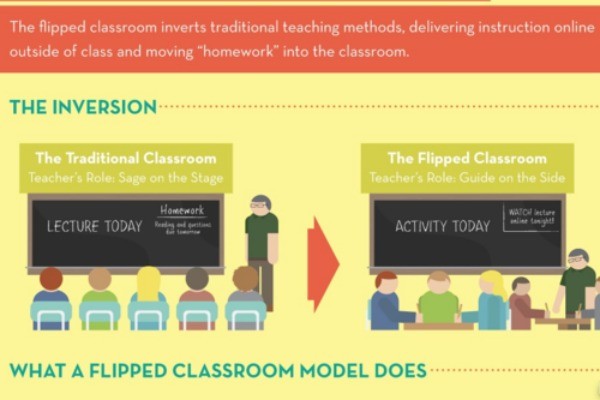
Flipping the Classroom discusses the importance of the old learning techniques, learning online, and bringing homework into the classroom. Its purpose is to bring learning to a whole new level. Flipping the Classroom was created and modified by Dr. Lodge. His creation is going to allow more creativity and students to get a more hands on experience with technology.


What a student does in the classroom can now be done at home. It will give teachers more time to teach, ask questions, and spend more time with the class. As of now, Flipping the Classroom is only being used for mathematics and it is being used for any grade level.


So far the expectations are high and students are coming to class with questions about materials they are unsure of. Teacher's are finding this new technology very useful because they are able to see what activities the students are doing and how (well) they are doing. Flipping the Classroom is a new and exciting experience that is going to help change and promote a higher level of learning!